For church care teams
Notice who's missing. Reach them before they drift away.
Shepherd's Hook gives your staff and volunteers one shared list of the people who haven't been around lately, a clear plan for following up, and a record of every call, text and visit.
Most people don't leave a church all at once. They miss a week, then a month, and nobody notices in time.
Care teams want to follow up. The hard part is knowing who to call this week, remembering who already called them, and making sure nobody slips through because two people each assumed the other had it.
Shepherd's Hook keeps that list for you. Your team checks people in on the weekend, the app counts the weeks someone has missed, and each person has a leader who reaches out. Everyone sees the same picture, so follow-up happens kindly and consistently.
The weekly rhythm
How it works
Mark who you saw
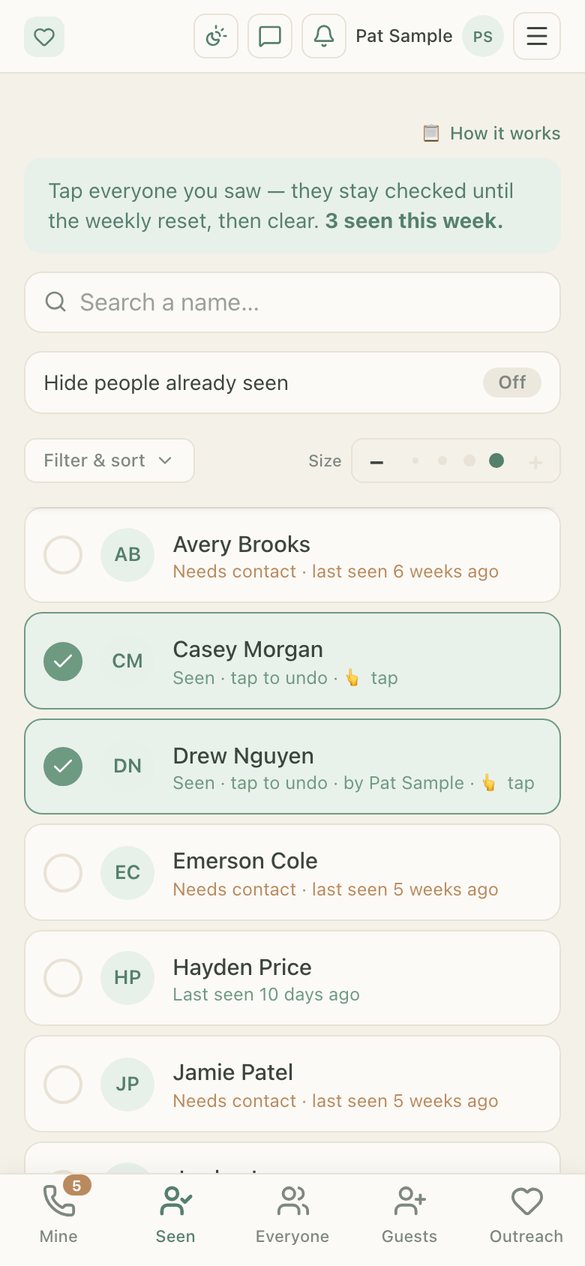
On the weekend, leaders open the Seen tab and tap or swipe the people they saw. Couples and families count once, and kids checked in through Planning Center count for their parents.
See who needs a call
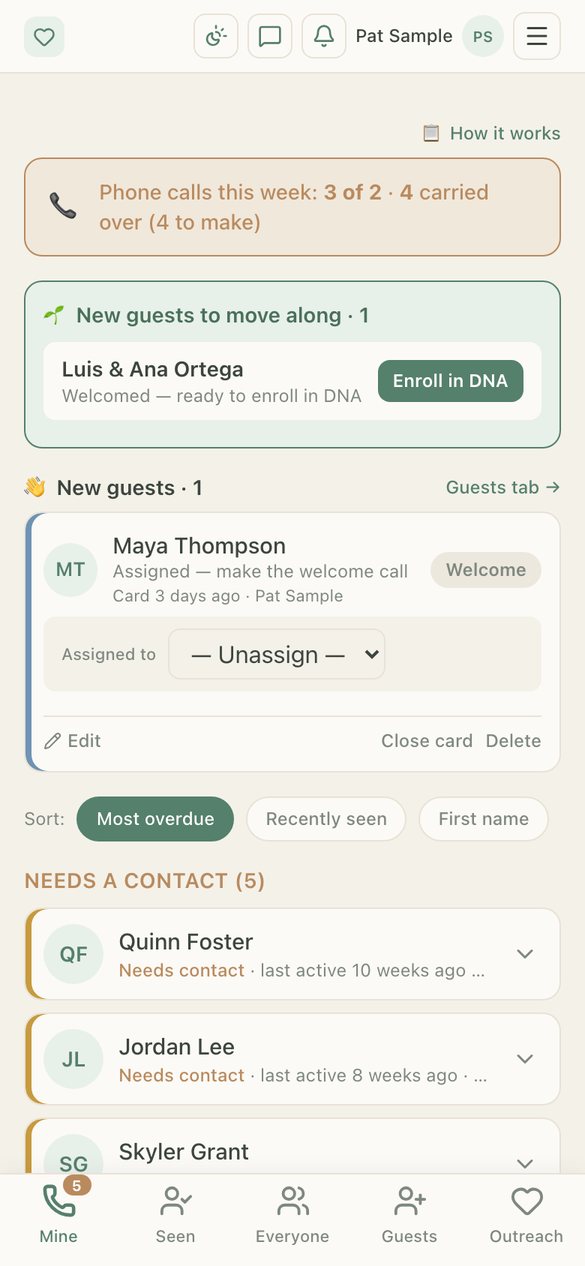
At your church's weekly reset, each leader's list shows who has missed enough weeks to need contact, longest-waiting first.
Reach out and log it
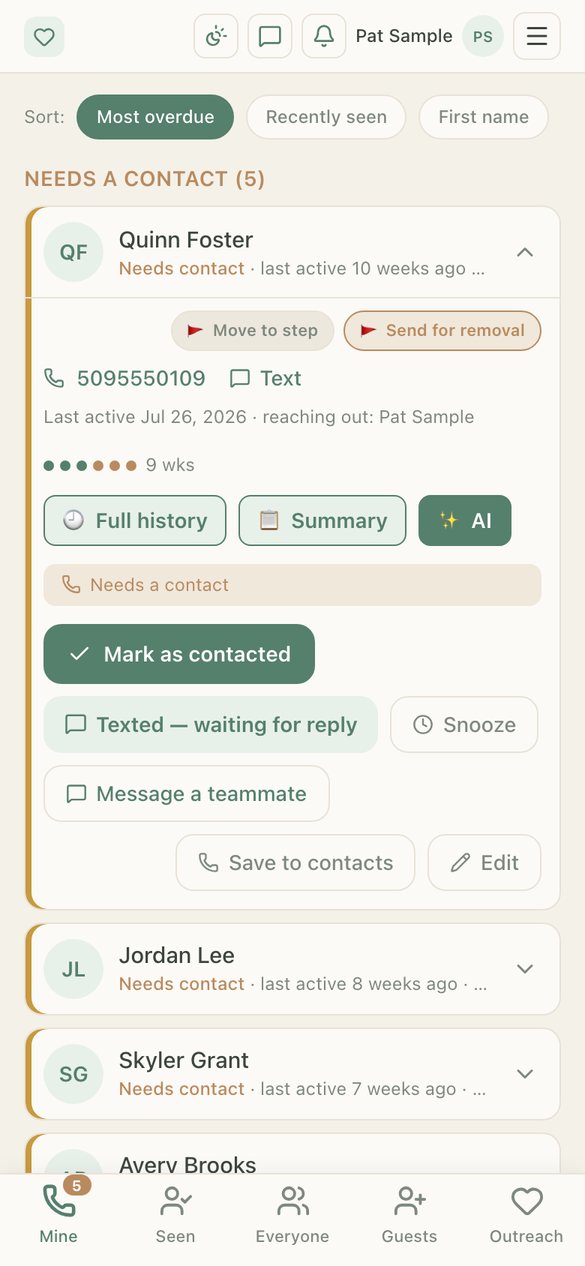
Call, text or visit, then log it in a couple of taps. The whole team sees it was done, so nobody doubles up and nobody is forgotten.
Follow your church's plan
If someone can't be reached, they move through the follow-up steps your church sets. Your lead team makes any final decision, and nothing is removed automatically.
See it
What your team sees
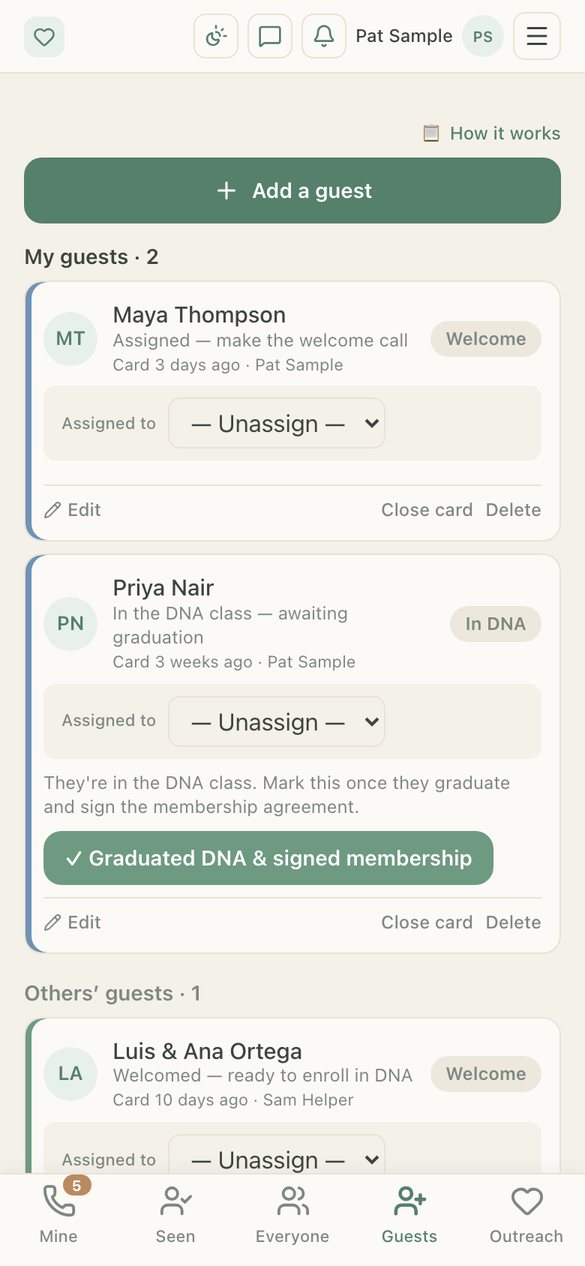
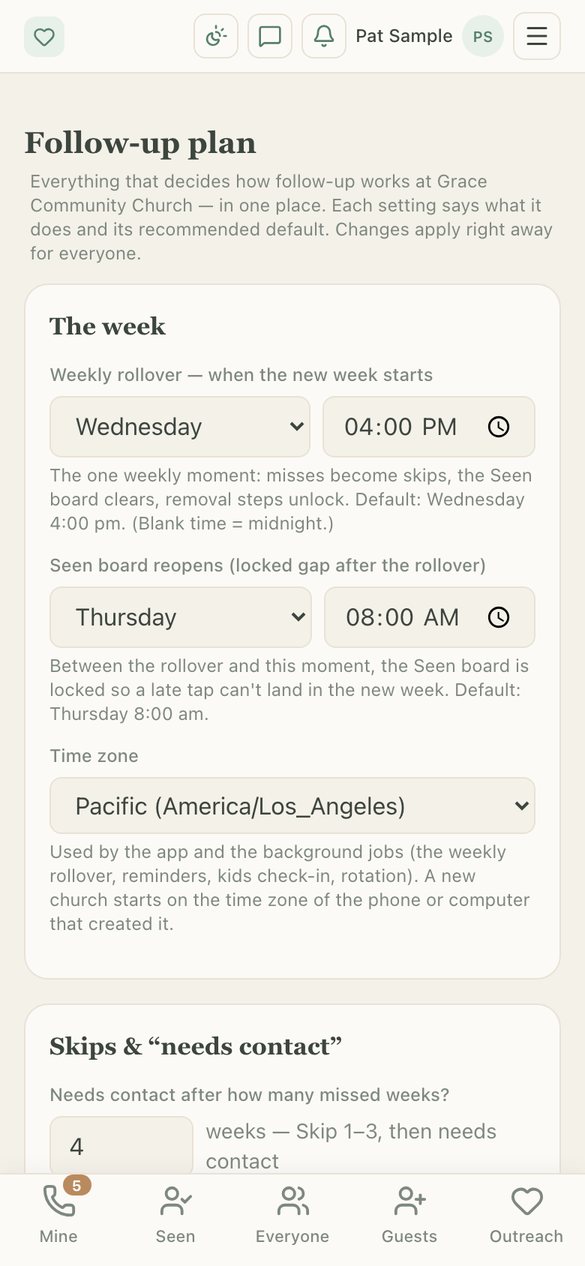
Real screens from the app, filled with a sample church.
Everything a care team needs
Built for the way churches actually follow up
♥Your follow-up plan
Choose how many weeks count as missing, how many reach-outs come before a decision, what each step is called, who decides, and when your church's week resets, in your own time zone.
♥Careful removals
Removals go through your steps and your lead team's sign-off, reasons stay private to leaders, and a mistaken removal can be undone for 30 days.
♥Guest welcome
Walk new guests from first visit to welcome call, next-steps class and joining, with a leader assigned at each stage.
♥Fair assignments
Choose who takes people, balance lists automatically, keep couples together, and rotate groups on a schedule.
♥A contact list from Planning Center
See people who are attending, serving or bringing their kids but aren't on your care list yet, so nobody new slips past.
♥Planning Center, read-only
Connect your church's own account to bring in check-ins, serving schedules and campuses. Shepherd's Hook only reads; it never changes your Planning Center data.
♥Team messages and announcements
Message a teammate about a person, send announcements your staff can reply to, and get reminders when someone is due for contact.
♥Lead team oversight
Reports, weekly call goals, each leader's activity, and a heads-up when someone marks people seen at the wrong campus.
♥Expenses and receipts
Snap a receipt, route it for approval (nobody approves their own), close each month with a clean report, and invite your bookkeeper to Expenses only.
♥iPhone app
A real iPhone app with Face ID sign-in and home-screen widgets, plus a web app for any computer or tablet.
♥Optional AI help
Follow-up summaries and receipt reading, only for people who turn AI on. Children's names and phone numbers are never sent to it.
♥Roles that fit your church
Staff, lead team and an executive each see what their role allows, with switches for extras like adding people or editing the on-call schedule.
Coming soon
Check-In for events, classes and kids ministry
Check people in and out of camps, events, weekly classes and Sunday kids rooms, in the same app your care team already uses.
✓Events and camps
One-day events, multi-day camps with a check-in each day, or weekly meetings, each with its own roster, groups and settings.
✓Fast check-in and check-out
Search, tap to check in, tap again to check out, with whole households at once. Keeps working on a weak connection and catches up when it's back.
✓Secure pickup
Pickup codes and printable pickup passes, scanned at the door, plus a list of who may not pick a child up.
✓Pickup paging
When a parent arrives to pick up, the child's team leaders get a page on their phones so the child is ready to go.
✓Self check-in kiosk
Turn a tablet into a check-in station families can use themselves.
✓Live headcounts
See who's here right now by group, which leaders have arrived, and anything flagged.
✓First aid and medic mode
Allergies, conditions, medications and schedules, emergency contacts and a treatment log, visible only to your medics and leaders.
✓Forms, waivers and e-signatures
Upload your own forms, sign on the spot or scan paper copies, and require signed forms before check-in.
✓Rosters and imports
Import from a spreadsheet, add your own fields, track fees paid or owed, and print roster sheets.
✓Teams and team leaders
Balance kids into groups, give leaders a simple view of just their team, and let them keep notes your leadership can see.
✓Security team
A patrol and incident log, shift schedules, and options you set for your church.
✓Apparel and gear sales
Track shirt and gear inventory, sales, holds for pickup and a turn-in sheet for your money counters.
✓Classes, rooms and calendar
Set up recurring classes and programs with rooms, times, instructors and capacity, and keep enrollments in one place.
✓Parent portal
Parents sign in to add their kids, keep their details current, and sign up for classes.
✓Roles for every volunteer
Staff, medics, security, team leaders and check-in volunteers each see only what their job needs.
Also coming soon
Shepherd's Watch: safety alerts at the press of a button
A separate app for your safety and security team. Wireless Flic buttons around your building, or carried by your team, send an instant alert to exactly the right people the moment something happens.
!One press, the right people
Each button sends to the groups and people you choose, plus whoever is on call this week.
!Different presses, different alerts
A single press, double press or hold can each mean something different, like medical, security or "come help".
!Buttons on the wall or in a pocket
Mount buttons in rooms and hallways, or give carried buttons to ushers, kids' check-in and parking teams.
!Alerts that get through
Phone alerts that are hard to miss, with tap-to-confirm so you know someone is responding, and follow-up if no one does.
!On-call schedule
Set who's on call each week, and schedule people on or off buttons ahead of time.
!Notices to your team
Send your safety team a notice and see who has read and confirmed it.
!A full alert log
Every press, who was alerted and who responded, saved for your leaders to review.
!Test mode
Practice drills and test buttons without alerting the whole team.
!Your church only
Each church's buttons, people and alerts are completely separate from every other church's.
Trust
Your people's information stays your church's
Only the right people see it
Each person on your team sees what their role allows. Private notes and removal reasons stay with your leaders, and the rules are enforced by the database, not just the screen.
Never sold, never advertised
We don't sell data, show ads, or track anyone across other apps or websites.
AI only with permission
AI features stay off until each person turns them on, children are never named to the AI, and our AI provider doesn't use your data to train its models.
Mistakes can be undone
Every change is recorded for your leaders, a removed person can be restored for 30 days, and old records are cleared after 12 months.
Planning Center stays untouched
Shepherd's Hook reads from your Planning Center account and never writes to it.
Leave whenever you like
People can delete their own accounts in the app, and churches can export or delete their records at any time.
Get started
Bring Shepherd's Hook or Shepherd's Watch to your church
Tell us a little about your church and we'll get in touch to set you up, import your people, and walk your team through the first week.
Pricing: plans are per church, not per person. Contact us and we'll find what fits your size.
Prefer email? Write to support@shepherdshook.org.
Built alongside a church care team that uses it every week.